Floppy Disks Memories: A 2026 Retrospective
By The Nostalgic Millennial ·
Updated
Floppy disks made computer files portable before home internet connections became common. Documents, programs and backups could move between machines on a disk small enough to carry. This retrospective traces that history and explains why recovering old files can require specialist help.
What was a floppy disk?
A floppy disk stores data on a flexible magnetic disk inside a protective enclosure. The familiar rigid 3.5-inch case came after larger formats. Capacity depended on the format. IBM’s history describes the common 1.44 MB high-density 3.5-inch disk; other floppy formats had different capacities.
From 8-inch disks to the 3.5-inch format
IBM began selling floppy disk drives in 1971. The Computer History Museum records the smaller 5.25-inch format in 1976 and Sony’s 3.5-inch introduction in 1981.
Disks also changed how software reached customers. Programs could be sold on removable media, and users could carry files between compatible computers. IBM describes this exchange before widespread PC networking as “sneakernet.”
Preserving digital history
An old disk may contain files that are difficult to replace. Reading it depends on its physical condition, recording format and compatible equipment. A modern USB floppy drive is not a universal recovery tool.
The Library of Congress describes its work with damaged disks and uncommon formats. Staff can capture a disk’s magnetic signals, then use the saved capture to interpret different recording formats without repeatedly reading the original. Recovery still depends on the disk and the available tools.
Deciding whether to seek recovery help
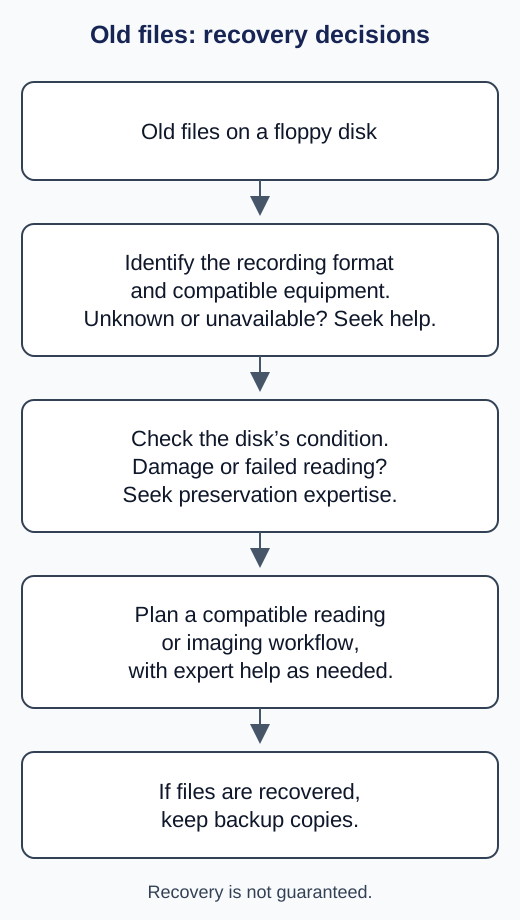
The diagram above is our editorial guide to those compatibility and condition questions. It does not diagnose a disk or offer a recovery service.
For an unknown format, damaged disk or failed reading attempt, seek help from someone with relevant preservation expertise. If files are recovered, keep backup copies on separate storage media so one storage failure does not erase the result.
Frequently asked questions
Can a USB drive read every floppy disk?
No. Disk size alone does not establish compatibility. Recording formats and the equipment needed to interpret them also matter.
Does a disk image guarantee recovery?
No. Imaging can preserve information for further analysis, but damaged media and unusual formats can require specialist work.
Does this article recommend a recovery product?
No. It provides historical context and preservation guidance, with no paid product recommendations.
Sources and references
- IBM: Floppy disk storage
- Computer History Museum: 1971 floppy disk history
- Computer History Museum: Memory and Storage timeline
- Library of Congress: Preserving collections on floppy disks
- Library of Congress: Personal digital archiving and backup copies
As an Amazon Associate, we earn from qualifying purchases. (paid link)
As an Amazon Associate I earn from qualifying purchases.